
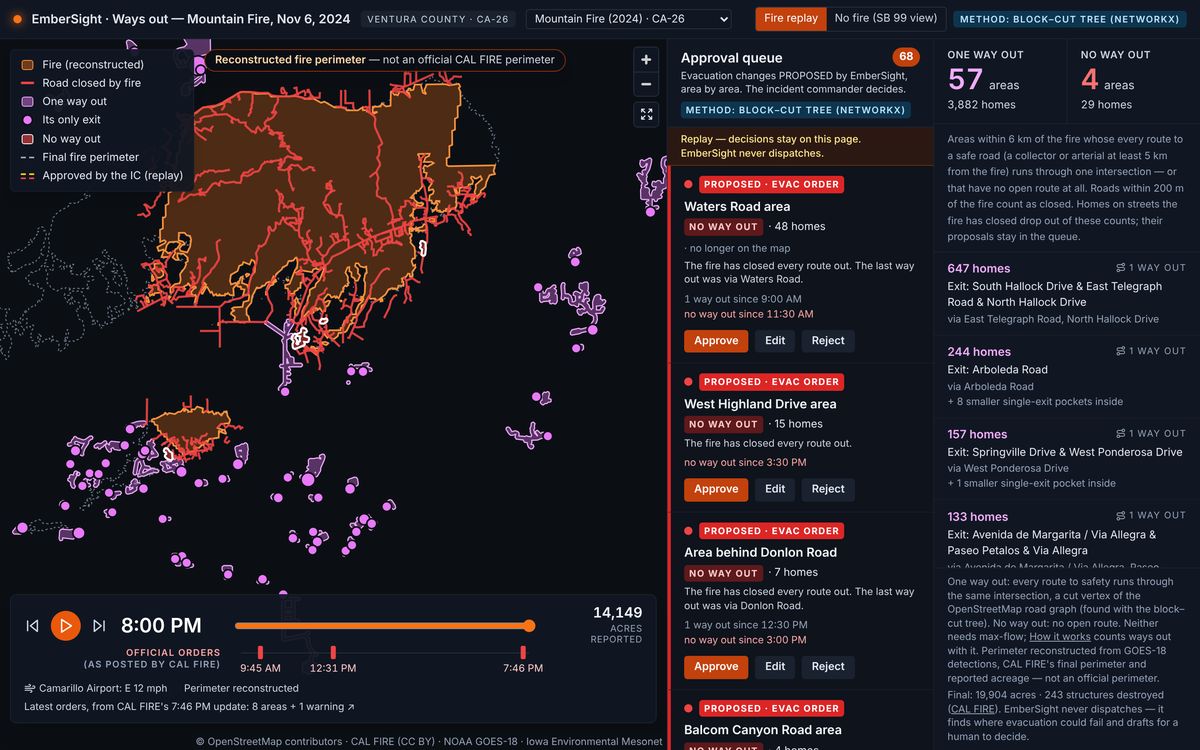
Mountain Fire, 2024
From 9 AM to 8 PM on the fire's first day, in our own congressional district.
- One way out at 8 PM
- 57 areas, 3,882 homes
- No way out at 8 PM
- 4 areas, 29 homes
Pick an active fire and eight AI agents go to work. Seven specialists each take one part of the incident: the weather, the fuel and terrain, the spread, the homes and facilities in its path, the roads and staging areas, the resources it calls for and the evacuation zones. They read more than a dozen public data sources, in parallel wherever they can, and a Master IC agent turns what they find into one briefing and a draft incident action plan. The incident commander gets the whole picture in one place, asks follow-up questions, and makes every decision.
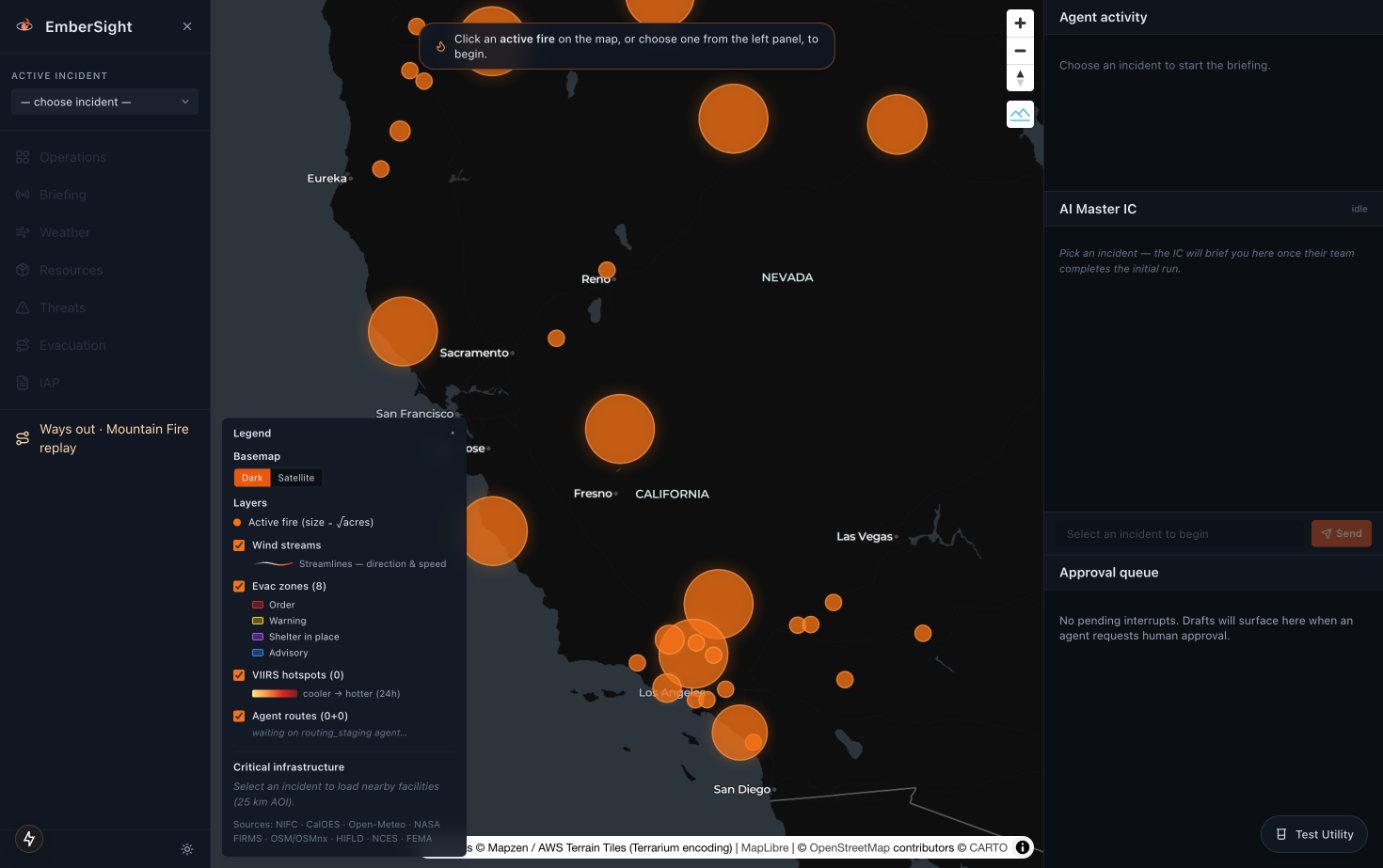
The live map of every active fire CAL FIRE and NIFC report. Pick one to start a briefing.
What an incident commander needs on a fast-moving fire is spread across separate systems: weather models and station readings, fuel and terrain maps, building and facility layers, road networks, evacuation zones. On a human team, each analyst pulls up their own sources and reports up, and the plan comes together through a planning cycle measured in hours, while the fire changes in minutes. EmberSight gives the commander a team that does the reading in parallel and refreshes any part of it on request.
| Step | A planning section, by hand | EmberSight's agent team |
|---|---|---|
| Gather | Each analyst opens their own sources, one after another. | Each specialist agent queries its own sources, and agents that don't need each other's work run at the same time. |
| Combine | Findings come together at the next briefing. | The Master IC reads every specialist's findings and drafts one briefing and plan as soon as the last one reports. |
| Check | Conflicts between reports come up in discussion. | Specialists that contradict each other, or report low confidence, are listed in the plan's dissent log. |
| Update | A new question means going back to the data. | A question is answered from what the team has already read; only the specialist that needs fresh data goes back out. |
| Decide | The incident commander. | Still the incident commander. |
The agents are organized the way an incident management team is: specialists report up, and the incident commander owns the plan. Each agent starts the moment the work it depends on is ready.
Weather and wind · Terrain and fuel
Both start together, the moment a fire is picked.
Spread simulation · Routing and staging
Both build on the weather and terrain: the spread from wind and fuel, the staging areas from wind direction and slope.
Values at risk · Evacuation intelligence · Resource recommendations
Values at risk reads the projected spread. Evacuation proposals come before resources, because they are the life-safety call.
Master IC
Waits for every specialist, then drafts the briefing and the incident action plan.
The incident commander
Every draft waits in the approval queue.
After the briefing, the commander talks to one counterpart, the Master IC, not to seven agents. Ask how confident the team is in the 12-hour spread and it answers from the team's latest work. If the wind has shifted, it can send the spread and weather specialists back for fresh data and the chat shows who it is consulting. Every tab of the command center updates as their answers come in.
Each agent mirrors a position on a real incident management team, so its output lands where that position's work would.
The agents use language models to read, explain and draft, but the numbers a plan rests on come from code. The most important of them is new in EmberSight 2.0: how many ways out each neighborhood still has. The ways-out engine finds the neighborhoods near a fire that are down to one way out or none, names the intersection each one depends on, and checks again as the fire closes roads. It is graph algorithms, not a language model, so the same map always gives the same answer.
OpenStreetMap's roads become a graph of the points where roads meet or end. Divided roads count once, bollards block, and one-way rules are ignored, because contraflow is normal in an evacuation.
Any road within 200 m of the fire counts as closed. A route only counts as a way out once it reaches an open collector or arterial road at least 5 km from the fire.
Two routes that meet at one intersection can both be blocked by one crash there, so routes only count if they share none. By Menger's theorem, the most such routes equals the fewest intersections whose closure traps the area, so one max-flow calculation gives both the count and the bottleneck.
One way out raises the evacuation agent's proposal to at least a warning; none raises it to at least an order. It never lowers one, and the commander still decides. To cover a whole map at once, the engine finds single-exit areas with the block–cut tree.
To show the engine on real fires, each replay re-checks the map every half hour and queues a proposed warning or order for every area that falls to one way out or none. We couldn't find an hour-by-hour perimeter for either fire, so each one is rebuilt from NOAA satellite detections, CAL FIRE's final perimeter and the acreage reported at the time, and the map labels it as a reconstruction.
From 9 AM to 8 PM on the fire's first day, in our own congressional district.
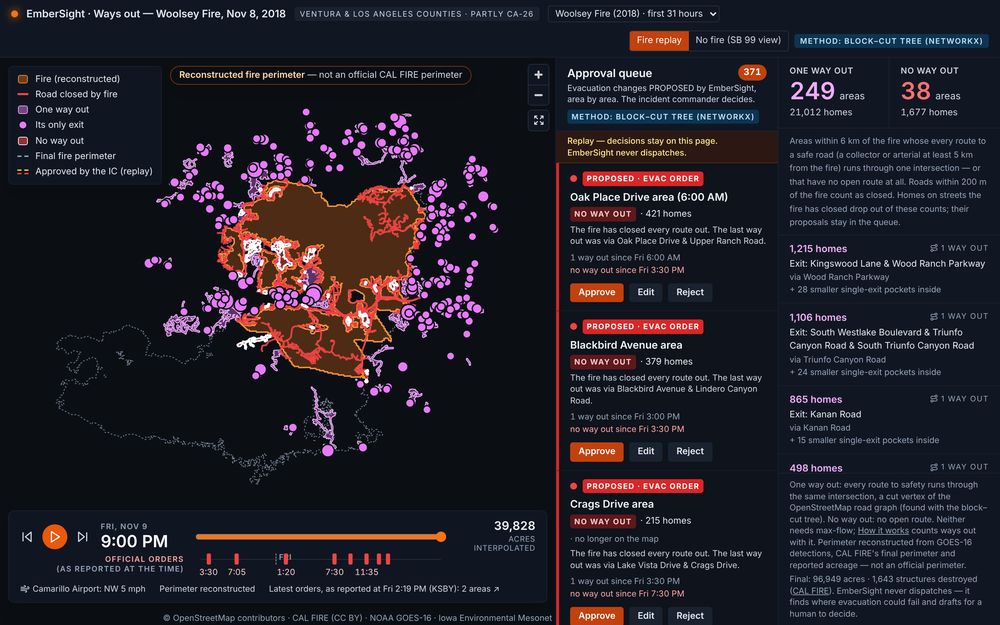
The first 31 hours, from its start near the Santa Susana Field Laboratory at 2:24 PM on Nov 8. The reconstruction covers the fire's northern part and never reaches the coast, which the real fire reached at Malibu by noon on Nov 9.
EmberSight drafts, recommends and proposes. It never dispatches, orders or publishes anything. The agents stop and wait for the commander on:
Each one lands in the approval queue with the draft, its confidence and its sources. The commander approves, edits or rejects it, and the agents carry on from exactly where they stopped. Every decision is logged, and a draft that is waiting survives a restart of the agent service.
The command center opens on a map of every active fire CAL FIRE and NIFC report. Pick one, and the briefing starts.